



Technical SEO Mistakes That Kill Rankings

Strong content and backlinks won’t guarantee search visibility if your site is riddled with technical SEO mistakes. Even a well-written blog or a well-designed landing page can struggle to rank when search engines encounter barriers during crawling or indexing. Small issues like broken sitemaps, indexing errors, or slow site performance create bigger problems: they limit visibility and discourage conversions. Technical SEO works behind the scenes, yet it is one of the most important parts of ranking well. Understanding these mistakes, and fixing them before they hurt your traffic, is essential for long-term growth.
Why Technical SEO Errors Hurt Rankings
Search engines rely on smooth crawling, fast response times, and accurate indexation to decide which pages deserve visibility. Common technical SEO errors interrupt this process. For example, a misplaced “noindex” tag could prevent a high-value page from ever showing up in search results. Duplicate versions of the same page may confuse algorithms, diluting authority and lowering rankings.
Technical SEO mistakes stop your content from ranking and also affect conversions. If your site loads slowly or has poor mobile usability, visitors leave before engaging with your offers. Search engines interpret these behaviors as a poor user experience and push your pages further down the results. The good news? Every error can be identified and corrected with the right tools and practices, starting with a systematic SEO audit.
Mistake #1: Misconfigured Robots.txt and Indexing Errors
The robots.txt file tells search engine bots which pages to crawl and which to avoid. It is powerful, but when misconfigured, it can destroy rankings. A single misplaced “Disallow” directive can prevent Google from crawling vital pages like product listings or service details. Similarly, overusing the “noindex” tag can keep critical content hidden from search results.
Google’s documentation confirms that blocking indexable pages via robots.txt prevents crawling altogether. This means those pages are invisible to search engines, regardless of their quality. Imagine publishing a detailed blog series only to realize your robots.txt stopped it from being discovered.
The fix is simple but requires attention. Use Google Search Console’s robots.txt tester to confirm that essential URLs are crawlable. Ensure “noindex” is reserved only for low-value pages like admin logins or duplicate archives. Audit your indexation reports regularly to confirm that all key pages are being indexed as intended.
Mistake #2: Poor Canonicalization and Duplicate Content
Canonical tags tell search engines which version of a page should be treated as the original. When used correctly, they consolidate ranking signals and prevent duplicate content problems. When misused, they confuse search engines and spread ranking authority too thin.
Errors often include missing self-referencing canonicals, conflicting canonicals pointing to multiple URLs, or incorrect tags on paginated series. These mistakes create duplicate content issues that lower visibility and waste crawl resources. For instance, an e-commerce category with pagination may appear as dozens of duplicate pages if canonical tags are missing.
The solution is to align canonical URLs with sitemap entries and page intent. Always double-check that each canonical tag points to the correct preferred version. For large sites, automated crawlers like Screaming Frog can detect inconsistencies across pages. Fixing these issues ensures your most important pages maintain authority and search engines clearly understand which version to rank.
Mistake #3: Ignoring Site Speed and Core Web Vitals (INP)
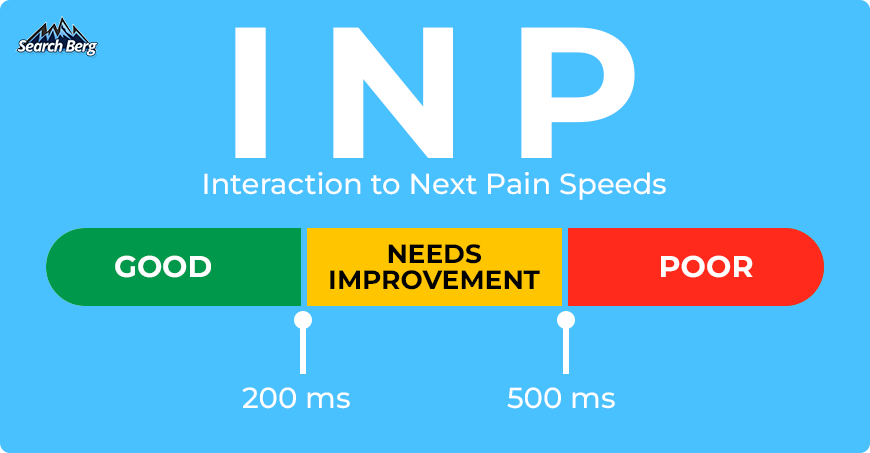
In 2024, Google replaced First Input Delay (FID) with Interaction to Next Paint (INP) as a Core Web Vital. This measure focuses on how quickly a website responds to user interactions. A poor INP score (above 500ms) signals laggy responsiveness, which frustrates visitors and harms rankings.
Common culprits include heavy JavaScript, oversized images, and third-party scripts that delay rendering. These slow elements make pages clunky to use, especially on mobile. A sluggish experience drives users away before they interact with your content or offers.
Solutions involve modern performance practices. Compress and serve responsive images in next-gen formats like WebP. Implement lazy loading for assets below the fold. Use code splitting to load only the JavaScript needed for a given page. Regularly test with PageSpeed Insights or Lighthouse to confirm INP values remain under 200ms for the best experience.
Mistake #4: Weak XML Sitemaps
An XML sitemap acts as a roadmap for search engines, helping them discover and prioritize pages. However, weak or broken sitemaps create confusion. Outdated entries, non-canonical URLs, or links to redirected or deleted pages waste crawl budget. Search engines may waste time on irrelevant URLs instead of focusing on pages that actually matter.
A crawl budget optimization strategy begins with a clean sitemap. Ensure only canonical, indexable pages are included. Keep sitemaps updated automatically, especially for large sites with frequent content changes. Use Search Console to submit and validate the sitemap, watching for crawl errors or warnings.
Fixing sitemap problems ensures Googlebot spends time on the right URLs. This maximizes efficiency, improves coverage, and helps critical pages rank faster.
Mistake #5: Ignoring Mobile-First Indexing
Google primarily uses the mobile version of a website for indexing. If your desktop and mobile versions differ, your rankings will suffer. Technical SEO mistakes in this area often include missing content on mobile, inconsistent structured data, or poor mobile performance.
For example, if product descriptions or schema markup appear only on desktop, Google may ignore them entirely. Likewise, slow mobile load times reduce engagement and discourage crawlers.

The fix is straightforward: adopt a responsive design that serves the same content across all devices. Use tools like SEOmator Mobile-Friendly Test to check for compatibility. Confirm that structured data and metadata match across mobile and desktop. Address mobile speed issues aggressively, as they directly influence ranking and usability.
Mistake #6: Weak Internal Linking and Orphan Pages
Internal links guide both users and search engines through your website. When important pages lack inbound links, they become orphan pages, essentially invisible to crawlers. These pages waste crawl budgets and miss opportunities to build topical authority.
Fixing this issue involves deliberate internal linking. Build topic clusters where cornerstone content links to supporting articles and vice versa. Add links to key pages from navigation menus, footers, or high-traffic blogs. Regular SEO audits will reveal orphan pages that need integration into the site structure.
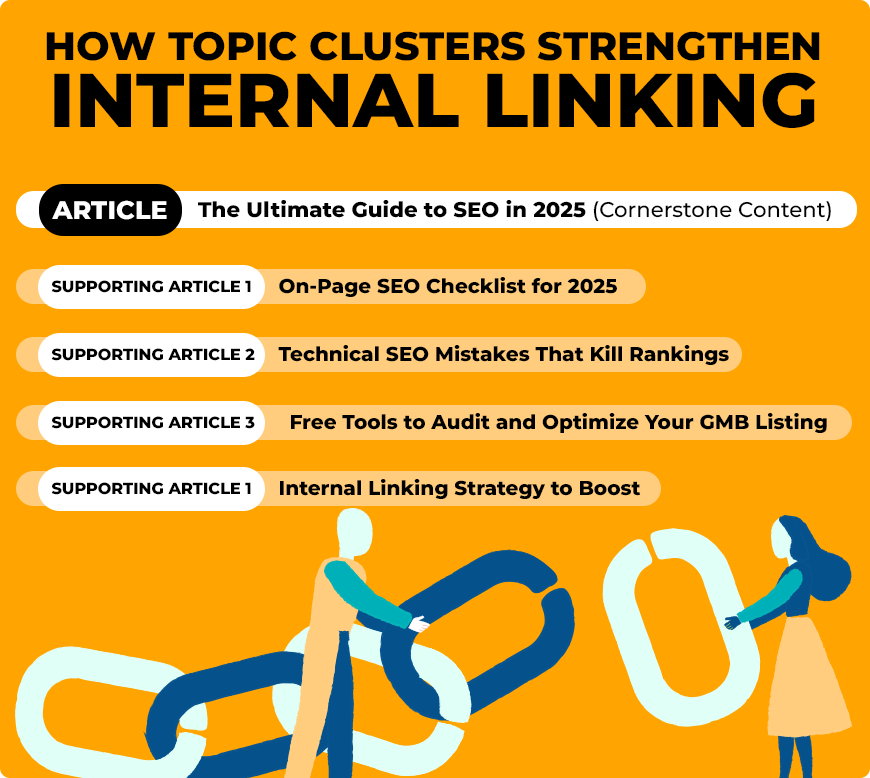
Strong internal linking ensures that search engines discover and value every important page.
Mistake #7: Ignoring International SEO and Hreflang
For multilingual or multinational websites, hreflang tags are essential. They signal the correct language and regional version of a page. Common hreflang mistakes include missing return tags, wrong language codes, or duplicate signals that confuse Google.
Such errors often result in the wrong version ranking in search results, frustrating international visitors. For instance, a user in Canada may see a page meant for the UK if hreflang is misapplied.
The fix is precise implementation. Use valid ISO language and country codes. Ensure reciprocal tags are in place (each hreflang annotation must point back). For large websites, tools like SEMrush or Ahrefs can identify incorrect or missing hreflang tags.
Quick Diagnostic Checklist
A reliable technical SEO audit should confirm:
- txt returns 200 and allows key pages
- Canonical tags align with sitemaps
- INP score remains under 200ms
- XML sitemaps contain only canonical, indexable URLs
- Internal links cover all important content
- Mobile and desktop versions maintain parity
FAQs on Technical SEO Mistakes
1. What are the most common technical SEO errors?
The most common issues include robots.txt misconfigurations, incorrect canonical tags, duplicate content, slow site speed, broken sitemaps, and poor crawl budget management.
2. How do I know if my site has crawl or indexation problems?
Google Search Console provides coverage and indexation reports. These highlight blocked URLs, errors, and pages excluded from the index.
3. What is crawl budget optimization, and why does it matter?
Crawl budget optimization ensures Googlebot spends resources crawling your most important pages, not duplicates, redirects, or low-value parameters. It improves efficiency and speeds up indexation.
4. What Core Web Vital should I focus on in 2025?
The most important metric is INP (Interaction to Next Paint). This measures how responsive your site is to user actions. Aim for under 200ms for an excellent rating.
Need Help Fixing Technical SEO Mistakes?
Technical SEO problems can undo months of content and link-building work. The good news is that every mistake has a clear solution. A professional SEO audit can uncover hidden errors, from crawl issues to duplicate tags, and provide a roadmap for correction. Addressing these issues early ensures that your site remains competitive and visible in search results.
Don’t let unseen technical issues hold your site back. Contact Search Berg today for a free consultation and let our SEO experts help you fix crawl budget optimization, indexation problems, and other technical errors before they cost you valuable traffic and leads.
Subscribe for More Insights
Explore more news, knowledge, and insights related to Google Business Profile and its uses.
No spam, just expert advice!