



Google Chrome Introduces “Help Me Write” AI Assistant
The tool uses Gemini AI for hands-on writing assistance.

Highlights:
- Google introduces ‘Help Me Write’ on Chrome browser.
- Harnesses the power of Gemini AI for writing assistance.
- Understands the context for tailored suggestions.
- Aimed at streamlining writing experience, currently in the experimental phase.
Google Gemini has been doing the rounds quite a lot of late. You might remember us mentioning the tool replacing Bard in a post we did not so long ago. Well, it looks like it’s not nearly done making heads turn.
On February 22, Google announced it was rolling out a ‘Help Me Write’ feature on its Chrome browser. This innovative tool harnesses the power of—you guessed it—Gemini AI, Google’s latest AI model.
‘Help Me Write’: The New AI Writing Assistant on the Block
Imagine having an AI assistant at your fingertips, ready to assist with your writing tasks. It’s by no means a stretch of the imagination. We already have Google Translate, an AI assistant for transcending language barriers on the fly.
‘Help Me Write’ does the same, only for written content or discourse. From composing product reviews to writing emails to adding notes, you can now do it all on your Chrome browser, all thanks to Google Gemini.
Initially launched in Chrome M122 for Windows PCs and Macs, this feature is rolling out in the United States for the time being. Users can access it in Settings under the ‘Experimental AI’ panel.
A New Approach to AI-generated Content
What sets ‘Help Me Write’ apart is its ability to understand context. It analyzes the webpage you’re on to provide suggestions relevant to your writing needs.
With Google AI search, the add-on can do everything, from drafting sales listings with product specifications to answering inquiries with little to no information.
Case in point: This polite email, which the tool generated from a short nine-word prompt (“plane lands at 9 – ask to check in early”).
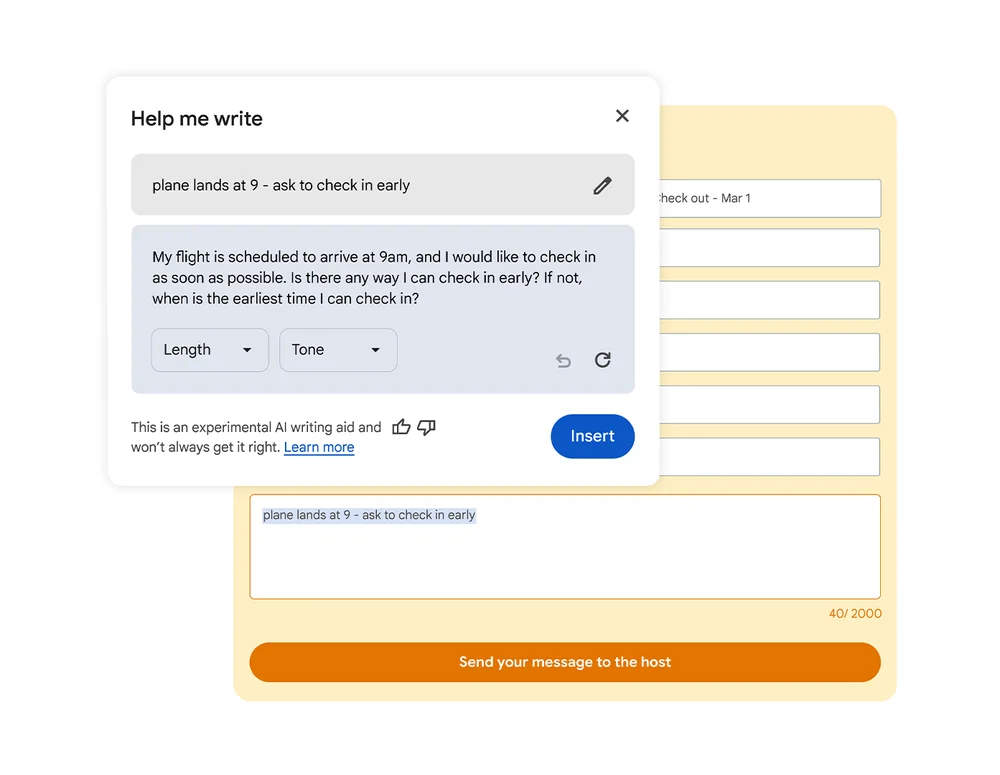
With its newest AI offering, Google aims to streamline the writing experience, making it more accessible and efficient for users worldwide.
‘Experimental’ Being the Keyword
Despite its accessibility, the tool exists under a panel called ‘Experimental AI’ for a good reason. It’s unclear what the future holds for the AI writing assistant.
However, it is evident to the discerning eye that Google plans to make this tool a Copilot equivalent for its Chrome browser. Despite its limited access, it’s safe to say this feature’s here to stay.
Stay tuned for more updates as ‘Help Me Write’ continues to evolve and expand its reach.











Excellent, what a web site it is! This weblog gives valuable facts to us, keep it up.
Hey! I know this is kinda off topic but I was wondering
if you knew where I could find a captcha plugin for
my comment form? I’m using the same blog platform as yours and I’m
having problems finding one? Thanks a lot!
My developer is trying to persuade me to move to .net from PHP.
I have always disliked the idea because of the costs.
But he’s tryiong none the less. I’ve been using WordPress on a variety of websites for about
a year and am worried about switching to another platform.
I have heard great things about blogengine.net.
Is there a way I can import all my wordpress content into it?
Any help would be greatly appreciated!
Attractive section of content. I just stumbled upon your
blog and in accession capital to assert that I get actually enjoyed account your blog posts.
Anyway I will be subscribing to your feeds and even I achievement you
access consistently fast.